Apple Unveils iOS 26 and iPadOS 26: Fresh Redesigns, Smart Features, and Compatibility Guide for iPhone 17 Owners
6 months ago | 5 Views
In a move that's got tech enthusiasts buzzing, Apple has just dropped iOS 26 and iPadOS 26 on September 15, 2025, right in sync with the launch of the highly anticipated iPhone 17 series. This free update promises to breathe new life into your devices with sleek redesigned interfaces and a slew of innovative features. Whether you're unboxing a shiny new iPhone 17 or eyeing an upgrade for your current gadget, here's everything you need to know about this game-changing release.
A Stunning Visual and Functional Overhaul
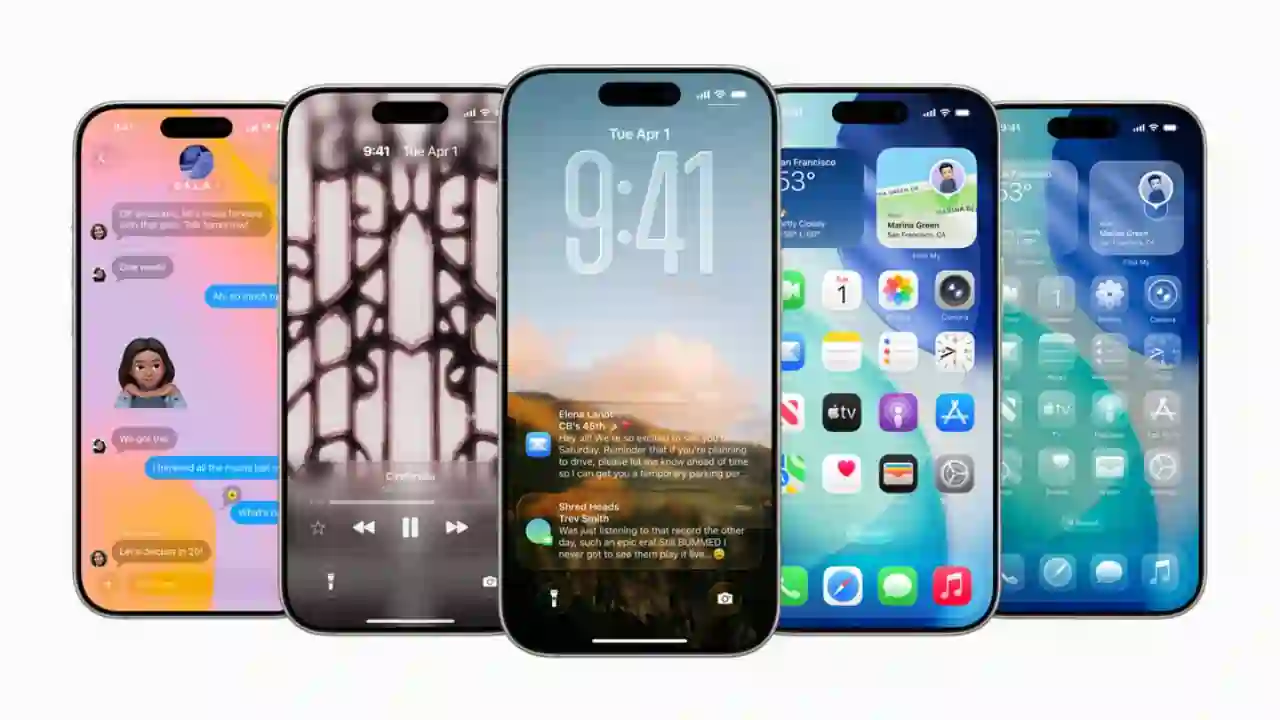
At the heart of iOS 26 and iPadOS 26 is the "Liquid Glass" interface—a translucent, fluid design that adapts seamlessly to your content, creating a more immersive and consistent look across apps and screens. Imagine your home screen icons and widgets taking on a glassy sheen that shifts colors based on your wallpaper or the time of day. It's not just pretty; it's practical, making navigation feel effortless whether you're swiping on an iPhone or multitasking on an iPad.
The redesign extends to core apps too. The Photos app now uses smart organization to sort your library by themes like trips, pets, or even receipts, all powered by on-device machine learning. Messages gets a fun boost with animated text effects, customizable Tapbacks using any emoji or sticker, and RCS support for smoother chats with Android users. And for iPad users, the long-awaited Calculator app finally arrives, complete with Math Notes for handwriting-based equations that solve themselves in real time.

Power-Packed New Features with Apple Intelligence
Apple didn't stop at aesthetics; they've infused iOS 26 and iPadOS 26 with advanced smarts via Apple Intelligence. On supported devices, Siri evolves into a more intuitive assistant, pulling from your personal context to suggest tasks in Reminders—like adding groceries from an email or following up on a conversation. Image generation tools let you create custom visuals right in Notes or Photos, while writing aids refine your prose with tone adjustments and proofreading.
Privacy remains a priority, with features like app locking and hiding for sensitive info, plus enhanced controls in Settings to manage what apps access. For iPadOS specifically, Smart Script in Notes refines your handwriting on the fly, making it straighter and more legible without losing your style. Gaming gets a lift too, with better integration for multiplayer challenges and friend recommendations. These updates make everyday tasks—from boarding pass tracking with airport maps to secure password syncing across devices—feel more connected and efficient.
Does Your Device Qualify? Full Compatibility Breakdown
The best part? This update is free and rolls out over the air, but not every iPhone or iPad makes the cut. iOS 26 supports iPhones with A12 Bionic chips or newer, keeping things accessible for a wide range. Here's the rundown:
- iPhone 17, 17 Plus, 17 Pro, and 17 Pro Max (all fully compatible, including full Apple Intelligence)
- iPhone 16 series (all models)
- iPhone 15 and 15 Plus
- iPhone 15 Pro and Pro Max
- iPhone 14, 14 Plus, 14 Pro, and Pro Max
- iPhone 13, 13 mini, 13 Pro, and Pro Max
- iPhone 12, 12 mini, 12 Pro, and Pro Max
- iPhone 11, 11 Pro, and Pro Max
- iPhone XS, XS Max, and XR
- iPhone SE (2nd gen or later)
Sorry, iPhone X and older models won't get it. Note that while base features work on all listed devices, Apple Intelligence requires A17 Pro or M-series chips, so older ones like the iPhone XS get the redesign but miss the AI perks.
For iPadOS 26, compatibility starts from A10 Fusion but drops some older models:
- iPad Pro (all models from 2018 onward)
- iPad Air (3rd gen and later)
- iPad (7th gen and later)
- iPad mini (5th gen and later)
Apple Intelligence here needs M1 or A17 Pro chips. If your device isn't listed, it's time to consider trading up—especially with the iPhone 17 series now available.
How to Get the Update and What’s Next
Updating is simple: Head to Settings > General > Software Update on your iPhone or iPad. Back up first to avoid hiccups, and ensure you're on Wi-Fi. The rollout coincides perfectly with the iPhone 17 launch, so new buyers can dive right in.
This release marks Apple's push toward a more intelligent, unified ecosystem. As users settle in, expect minor tweaks via point updates. If you're eligible, don't wait—iOS 26 and iPadOS 26 could transform how you interact with your Apple gear.
Read Also: WhatsApp's New Threaded Replies: Revolutionizing Group Chats for Better Organization
Get the latest Bollywood entertainment news, trending celebrity news, latest celebrity news, new movie reviews, latest entertainment news, latest Bollywood news, and Bollywood celebrity fashion & style updates!
HOW DID YOU LIKE THIS ARTICLE? CHOOSE YOUR EMOTICON!
# Apple # iOS26 # iphone17



.webp)